Year plans, unit plans, and your TPGP: every Alberta planning document in one place
September 23, 2026 · The Eduverse team
Strong planning is not paperwork. It is the difference between a year that builds and a year that merely arrives — where what you taught in October is still load-bearing in April, where the assessment measures what was actually taught, and where you know by the middle of a unit whether you are ahead or behind, instead of finding out in June.
Every teacher knows this. It is also the first thing that gives when the term starts moving.
And the hard part was never the writing down. It is holding the decisions together. Which units land in which term, how many weeks each one honestly gets, what evidence will tell you it worked, and what happens to the rest of the year when a week disappears into a concert. Those decisions live at different altitudes — the year, the term, the unit, the lesson — and they only work if they agree with each other.
Which is usually where the documents part company.
Long-range plans come due in the fall — your board sets the date, and in a lot of divisions that means October — by which point you have been teaching the year for two months. You know this class now. You already know the September plan was optimistic. So you write it up in the evenings, after days of actually doing it — and then you write the unit plans, and the day book detailed enough that a stranger could run your Thursday, and the growth plan the province requires of you each school year.
By November the outcomes for Matter live in four files that quietly disagree with each other, and the only one anybody has read is the one you handed in. Nothing has gone wrong, exactly. You just spent a weekend typing the same curriculum into four places.
That is the problem the Eduverse Planning Hub is built around. Not "here are planning templates" — one spine, where the year plan decides the shape of the year, the term plans fall out of that decision, the unit plans hang off the terms, and the lessons hang off the units. Change your mind in one place and the others know. Each one is a real document you can export and hand to whoever asked for it.
All of it sits in the Plan tier, which is paid. We would rather say so up front than let you find it three clicks in.
The spine
The four teaching documents genuinely nest, and the software treats them that way rather than as four folders that happen to sit beside each other.
Your year plan decides which units land in which term and how many weeks each one gets. Each term plan is generated from that decision — it inherits the months, the report-card labels, and the units you assigned. Unit plans carry the design work. Lesson plans are where a unit becomes Tuesday.
Sitting off to one side is your growth plan, because a TPGP is about you rather than about a subject. We will come back to it, since it is the one the province actually requires.
October: the plan you owe
The Year Plan Builder walks three numbered steps, and the first is the boring one. 1 Document Info is the header that ends up on the printed page — grade, subject, your name, school, board.
2 Term Setup is where the year gets its shape. Three terms, each with a start month, an end month, a week count, and a report-card label. The defaults are the pattern most Alberta schools run: September to November, December to March, April to June, at twelve, twelve and ten weeks. It is easy to promise yourself thirty-eight weeks of instruction in a thirty-four week year, and much easier to notice now than in April — which is what the week bar is for, once you have built.
Then you press Build My Plan.
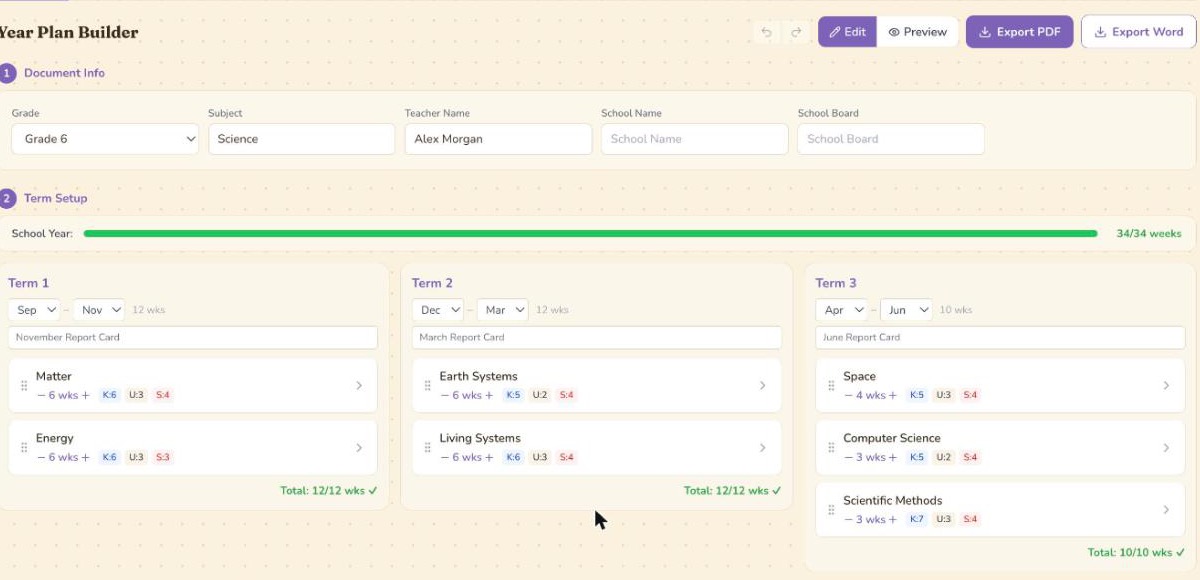
Here is what came back when we built a Grade 6 Science year plan while writing this. Term 1: Matter, then Energy, six weeks each. Term 2: Earth Systems, then Living Systems, six weeks each. Term 3: Space at four weeks, Computer Science at three, Scientific Methods at three. Thirty-four of thirty-four weeks accounted for, each term adding up to exactly the number of weeks it was given.
Those seven are Alberta's Organizing Ideas for the new K–6 Science curriculum — all seven run at Grade 6, though Space only begins in Grade 4 and Kindergarten has four — and they arrive already distributed. If the order is wrong for how you teach — and it usually is for somebody — you drag units between terms until it matches your year.
3 Optional Sections only fills in after that first build — the heading sits there from the start, but the list arrives with the plan. It holds the extras a principal sometimes asks for: assessment plan, resources and materials, cross-curricular connections and differentiation arrive switched on; I Can statements, key vocabulary, field trips, and Indigenous and First Nations, Métis and Inuit perspectives wait for you to want them.
Two things worth knowing before you lean on any of this.
The year plan works in months and week counts, not calendar dates. That is deliberate. A long-range plan that commits to exact dates in the fall is a work of fiction by February; real dates belong one level down.
And rebuilding is safe. Every rebuild auto-saves your current arrangement as a version first, and you can label and restore versions yourself — it keeps your last three. So if you want to try the year a different way in February, try it.
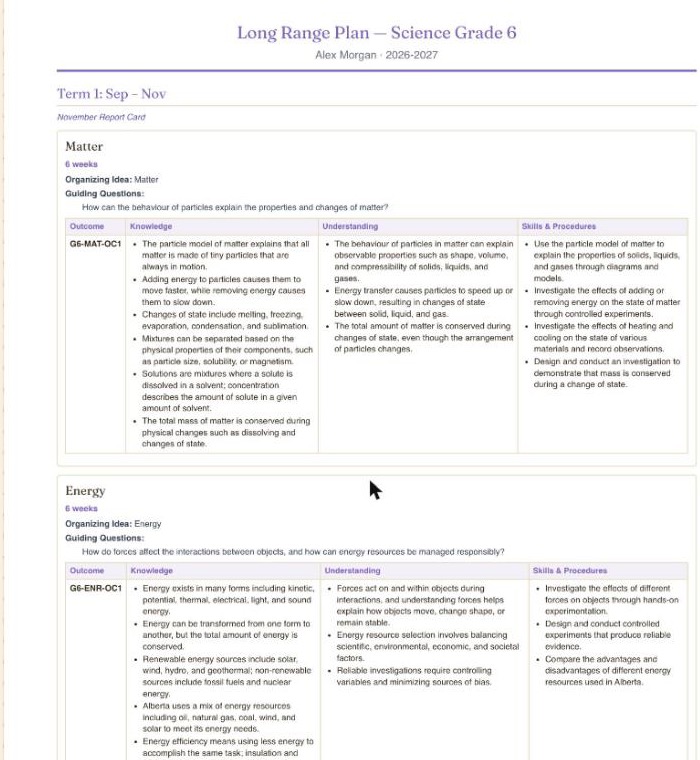
The document that comes out is titled Long Range Plan — the name many Alberta schools use for it, though you may know it as a Year Plan or a Year at a Glance. Each unit carries its Organizing Idea, its Guiding Questions, and the Knowledge, Understanding, and Skills and Procedures beneath it. That is Alberta's own structure for the renewed curriculum, which we wrote about in what actually changed in unit planning. Export it to Word, or open a print-ready page.
One limit, and it is a real one: the year plan builder itself is Alberta Science. Press Build My Plan and it loads that grade's Alberta Science units, whatever subject you typed into Document Info — there is no add-your-own-unit control in the builder. For Math, Language Arts or Social Studies, the Unit Plans tab is where the work happens: you name your own units there, and the unit plans, lesson plans and their exports all behave properly. But the long-range document, and the term pacing grids generated from it, are Science today.
The week the concert eats
A term plan is generated from the year plan rather than typed from scratch. It reads your term months, your report-card label and the units you put in that term, and lays out a week-by-week pacing grid: week number, dates, unit, milestones, notes.
Two things in that grid earn their place.
You can mark a week non-instructional. This matters more than it sounds. The week of the winter concert is not a teaching week, and a pacing plan that pretends otherwise is the kind of document teachers stop trusting by February. Mark it, and the arithmetic stops lying to you.
And each week carries a link through to the Day Planner, so the pacing grid and the day book stay within reach of each other rather than living in separate tabs.
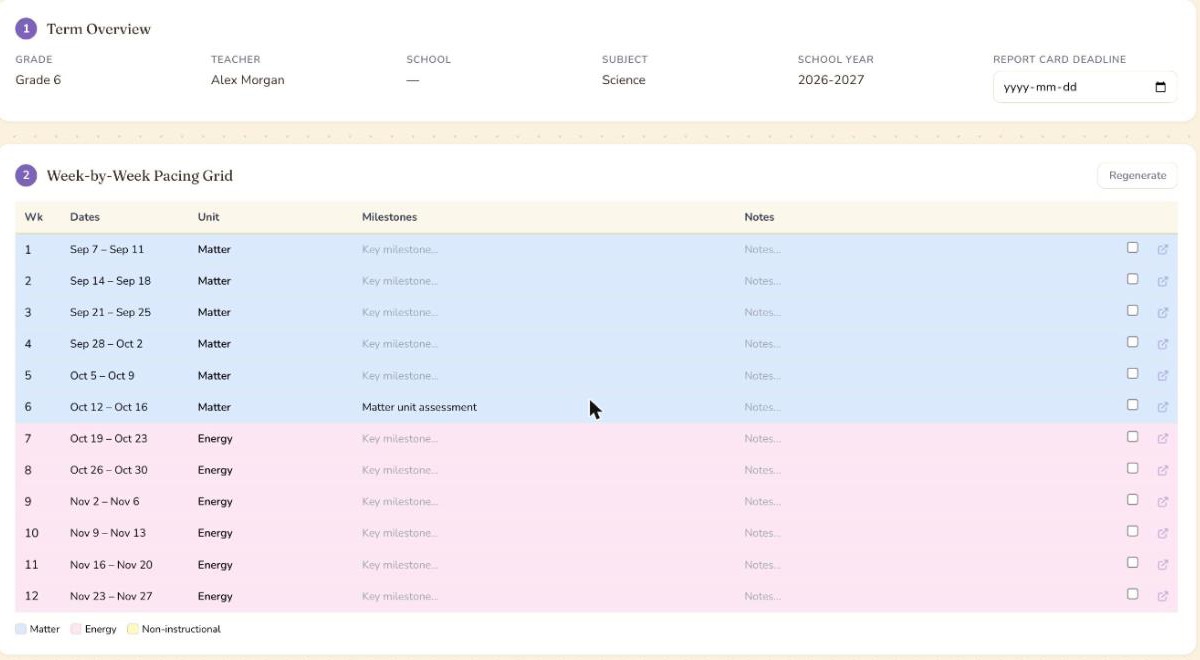
Key Dates is where real dates finally live. Each row is a date, an event label, and a type — report card, assessment, holiday, PD day, or other — and the report-card deadline is already sitting there, derived from the term setup you did in the year plan.
Eleven optional sections sit below the grid, from assessment plan and instructional strategies through to key vocabulary and notes and reflections. Versions work as they do in the year plan: label one, restore it later.
If you change the units in your year plan afterwards, the term plan says so. A banner tells you the pacing grid is out of date and offers to regenerate — and warns you first that regenerating resets your milestones and notes, because it does, and that is better to hear before you click than after.
The Tuesday you actually teach
Unit plans are where the thinking goes, and the form does not pretend otherwise. It is built on Understanding by Design, in three stages, in order.
1 Desired Results asks for big ideas and enduring understandings, then essential questions. The prompt on the first box is the real one: what should students understand long after this unit is over?
2 Assessment Evidence wants formative and summative, as separate fields, before you have planned a single activity. That ordering is the whole method. A form that asks for activities first will talk you out of backward design without either of you noticing.
3 Learning Plan covers differentiation, First Nations, Métis and Inuit connections, and a resources checklist.
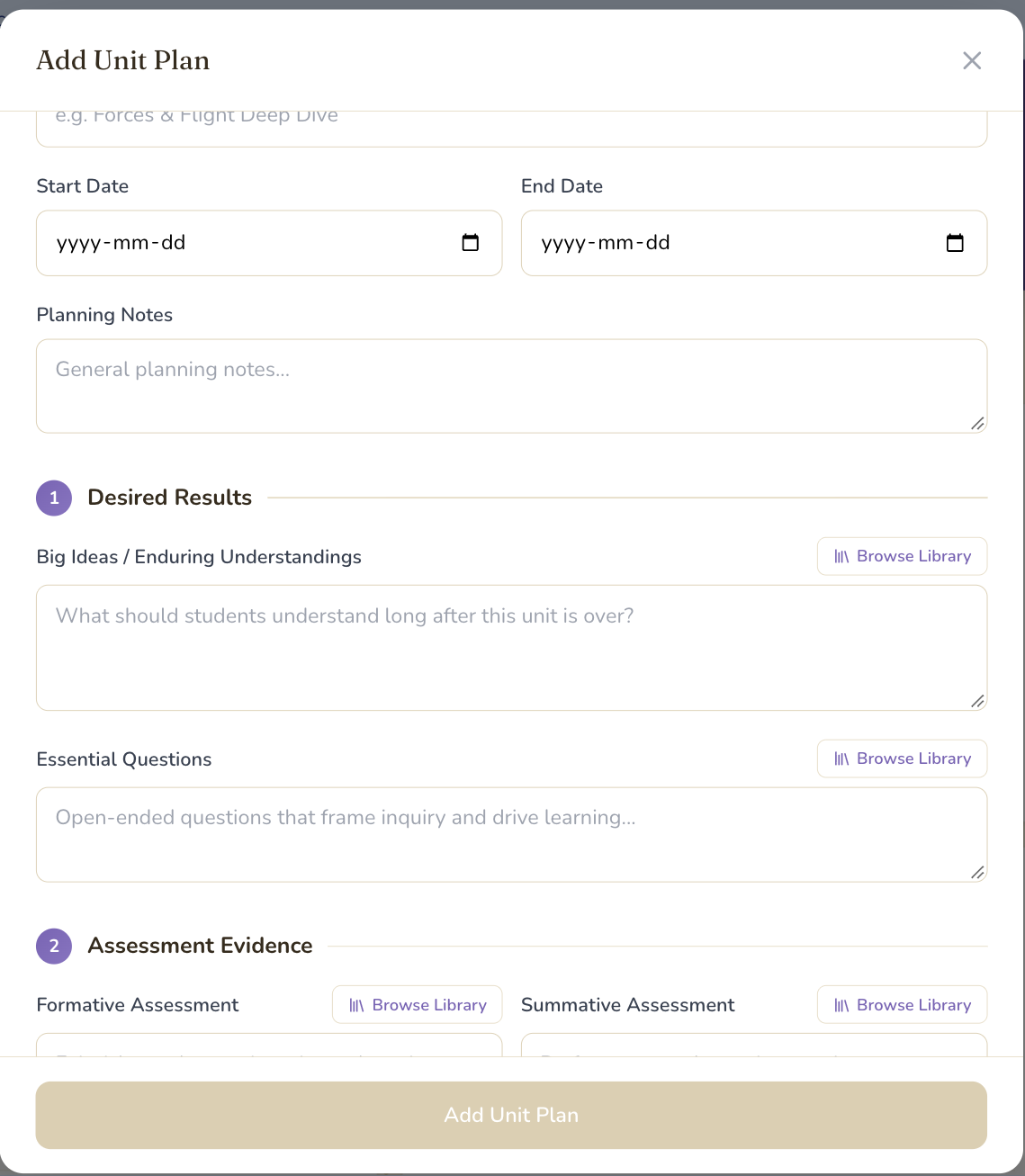
There is also a teacher reflection field, which is the one nobody fills in during planning and everybody is grateful for in June. Each of the big-idea, essential-question and assessment fields has a Browse Library button if you would rather start from an existing one than face the blank box.
Every unit plan carries its curriculum outcomes as a table and its topics with durations. For Alberta Science you can populate all of your grades' units in a single action. Word exports come out in Times New Roman, twelve point — because that is what a document you hand to an administrator is expected to look like, and arguing with that convention has never once been worth it.
Lesson plans
This is the one part of the stack we have written about at length already, so here is the short version.
The AI Lesson Planner takes a grade, a subject, a unit, optionally the specific I Can statements you are targeting — our plain-language restatements of official Alberta outcomes — and a time budget between 30 and 180 minutes. You can layer on an instructional approach, named teaching strategies, and the learning needs actually sitting in your room: ADHD, autism spectrum, reading and math learning disabilities, anxiety, gifted, English language learners and more, each tied to evidence-based strategies rather than general encouragement. Ten lesson sections toggle on and off, and fewer sections generates faster.
Unlike the year plan, lesson generation genuinely spans subjects — Science, Math, Social Studies, Language Arts, French, Health, Art, Music and Physical Education — when you generate from the AI Lesson Planner page itself.
For the full tour, including how a lesson lands in a period and what carries over to tomorrow, see inside the Eduverse Day Planner.
The one with a policy behind it
Your growth plan is the document with the least software around it and the most obligation behind it, so it is worth separating the two.
What Alberta actually requires. The Teacher Growth, Supervision and Evaluation Policy — Policy 2.1.5 — makes an annual growth plan the responsibility of every teacher on a probationary or continuing contract — and of other teachers too, where their own board's policy says so. Procedure 3 says a teacher "is responsible for completing during each school year an annual teacher professional growth plan that" reflects "goals and objectives based on an assessment of learning needs by the individual teacher", shows "a demonstrable relationship to the teaching quality standard", and takes into consideration the education plans of the school, the authority and the government. It goes to your principal — or, if your board's policy provides for it, to a group of teachers the principal delegates — "for review or approval", at a time your board's policy sets.
Two things that follow, and that the province leaves to your board rather than spelling out itself. Procedure 5 makes the year-end review a real step: you provide the completed plan, and the reviewer, in consultation with you, makes a finding on whether it meets Procedure 3. Procedure 6 is what hangs off that finding — a teacher who has not completed one "may be subject to disciplinary action as defined in the policy". That policy is your board's, which is also where your deadline lives.
And then there is Procedure 7, which a surprising number of teachers have never been told about:
Unless a teacher agrees, the content of an annual teacher professional growth plan must not be part of the evaluation process of a teacher under Procedures 9(c) and 10.
Your growth plan is a growth document. Its contents are not evidence in an evaluation unless you agree to that. Procedure 8 adds the sensible limit: a principal can still act on behaviour they have observed some other way — they just cannot reach into your growth plan for it. Worth knowing in June. Worth knowing rather more in the fall, when you are deciding how honest to be in it.
What the software does. The Growth Plan surface has three tabs: the standard, your goals, and the TPGP itself.
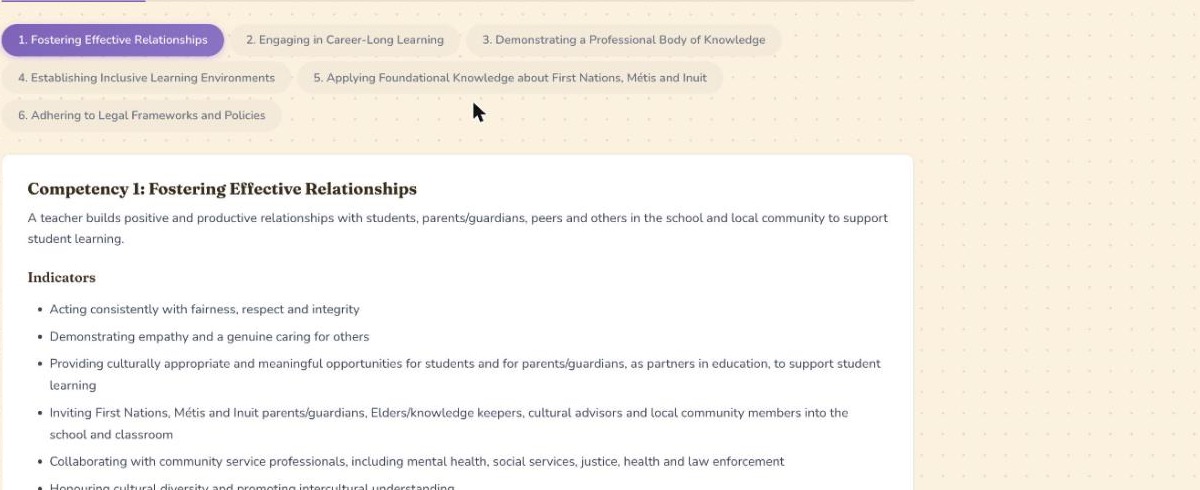
The first is the Teaching Quality Standard with its six competencies and their indicators, browsable, so you are writing against the actual wording rather than a half-remembered version of it. In Alberta it is labelled TQS — and Alberta is the province that ties an annual growth plan to its standard by policy.
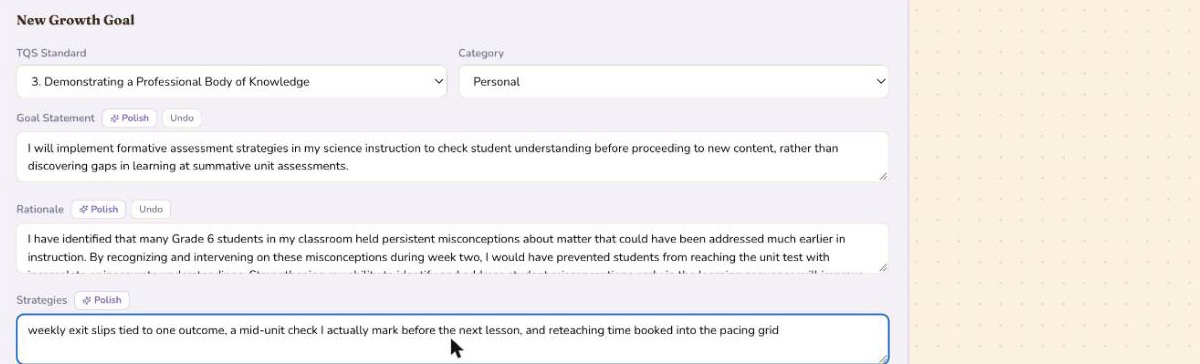
Goals are where the work happens. Each one attaches to a competency and asks for a goal statement, a rationale, your strategies, and the evidence you plan to gather — which is, more or less, the components list the ATA publishes, in fields. Action steps carry timelines.
You do not have to write any of it in growth-plan language, which is the part that takes most people the longest. Each field has a Polish button. Type the version you actually think — check whether kids actually get it before I move on instead of finding out at the unit test — and it comes back as this:
I will implement formative assessment strategies in my science instruction to check student understanding before proceeding to new content, rather than discovering gaps in learning at summative unit assessments.
An Undo sits beside it, so the rewrite is never one-way.
Then a mid-year reflection, an end-of-year reflection, and somewhere for supervisor feedback.

Generate TPGP turns the goals into a finished document, grouped by competency, with a narrative summary for each section and next steps at the end. You edit it, because it is a draft rather than an oracle, and when it is right you mark it final. Versions are kept and dated. Export to Word, or open a print-ready page.
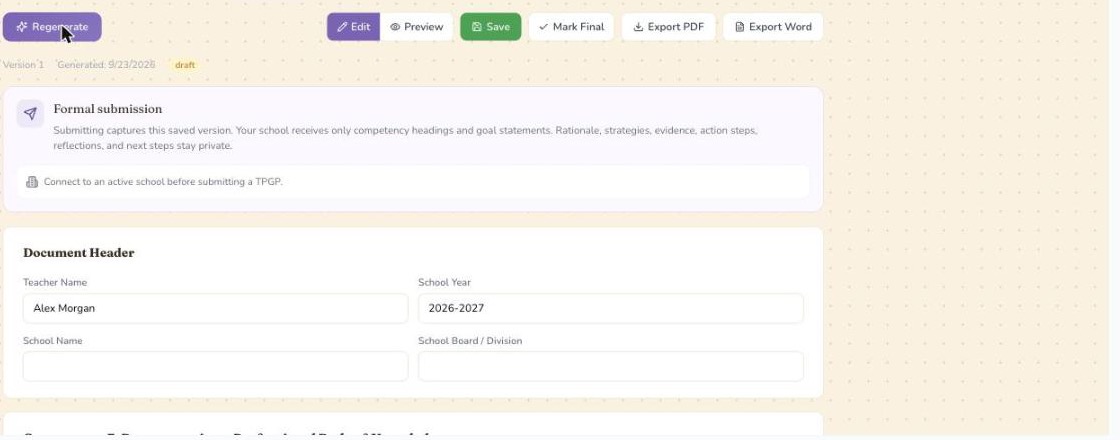
And then the part Policy 2.1.5 is actually asking for. If your school is on Eduverse, formal submission sends a specific saved version to your principal, and the panel tells you exactly what that sends before you send it. Submitted versions keep their own history, so you can see when yours was received and acknowledged.
What your principal sees
A growth plan is only honest if you know who is reading it, so this deserves its own section.
Nothing is shared until you share it, one document at a time. The boundary is this: only instructional fields are ever shared — your day plans if you turn that on, plus any year, unit or lesson plan, TPGP, or PD record you choose to share individually. Your reflections, wellness entries, student records, assessments and private notes are not included in any of them.
That holds at the field level rather than as a promise:
- A shared unit plan shows big ideas, essential questions, formative and summative assessment, resources and Indigenous connections. Your reflection, your notes and your differentiation notes stay yours.
- A shared lesson plan shows objectives, materials, assessment and outcome codes. Not your notes, and not your differentiation — which may name specific students.
- A shared TPGP, in the submission panel's own words, sends your school "only competency headings and goal statements. Rationale, strategies, evidence, action steps, reflections, and next steps stay private."
And every principal read is logged where you can see it. Who viewed your shared planning lists who opened what and when, in plain language — "opened a TPGP version you submitted", "viewed your shared planning documents" — newest first. Visibility that only runs one way is surveillance. This runs both.
Two honest notes. Day plans are shared as a whole from your account page rather than one at a time, so that switch is a different decision from the rest. And term plans cannot currently be shared — the sharing page shows a Term plans group that is always empty, however many you have built. We would rather write that sentence here than have you discover it with a principal waiting.
What this does not do yet
- The whole Planning Hub is the Plan tier. Paid.
- The year plan builder is Alberta Science. Other subjects get unit plans, lesson plans and exports, but not a generated long-range plan or the term pacing grid built from it.
- TPGP generation is written against Alberta's Teaching Quality Standard. The goals surface adapts to other provinces' standards; the generated document is Alberta-shaped.
- Export PDF opens a print-ready page and your browser's print dialog rather than downloading a file. Word exports are real files.
- Term plans are not shareable with a school yet, as above.
- Anything generated is a first draft, not a source. AI-written sections can name resources, titles and details that need checking. Read them before they go into a document with your name on it and your principal's on the cover.
Start with whatever is due first
If the fall planning deadline is the one on your calendar, start at the Year Plan Builder and let the term plans fall out of it. If it is June and the reflection is the thing you have been avoiding, start at Growth Plan instead — the goals you wrote in the fall are still sitting there, waiting to be reflected against.
Either way, you only type the curriculum once.
Sources: Product capabilities described here were checked against the Eduverse application implementation on September 23, 2026. Policy requirements are quoted from Alberta Education's Teacher Growth, Supervision and Evaluation Policy (Policy 2.1.5) and the Alberta Teachers' Association's professional growth planning guidance. Feature availability and plan details may change; see the teacher page for current information.